![Profile Image Teal-1.png]](https://www.glaciergrid.com/hs-fs/hubfs/Profile%20Image%20Teal-1.png?width=40&height=40&name=Profile%20Image%20Teal-1.png)
At GlacierGrid, we aim to provide more than just a thermostat. Our Supply Air Temperature (SAT) Sensor is a key component of the GlacierGrid Intelligence Platform, designed to give you a "look under the hood" of your HVAC system’s performance.
What is an SAT Sensor?
A Supply Air Temperature (SAT) Sensor is a wireless device installed inside the HVAC supply duct or near the supply vent. While the zone sensor measures the actual space temperature and works with the thermostat to determine when the RTU should call for heating or cooling, the SAT sensor measures the temperature of the air being delivered by the HVAC unit.
This allows us to confirm whether the equipment is truly heating or cooling as expected and helps identify potential mechanical or airflow issues that may not be evident from the zone temperature alone.
Why it Matters to Your Business
-
Faster Diagnostics: If your building feels warm, the SAT sensor helps us instantly see if your HVAC unit is failing or if the issue is external (like an open door or poor insulation).
-
Proactive Maintenance: By tracking historic data, we can spot a struggling HVAC unit before it breaks down completely.
-
Mobile Validation: You can now inspect individual sensors connected to specific equipment directly from your iPhone, helping you confirm they are online and correctly configured without needing a laptop.
How to Access Sensor Details via iOS app:
-
Open the GlacierGrid mobile app.
-
Navigate to the Thermostat Detail screen.
-
Select More Equipment Details.
-
Scroll to the Connected Devices section to see your specific SAT sensors.
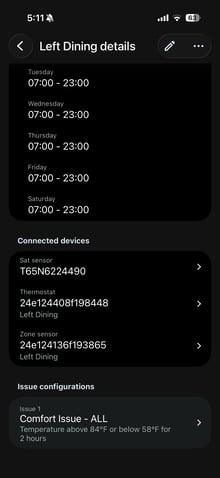
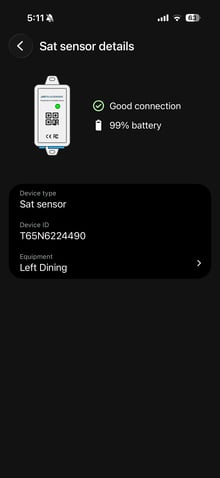
Note for Android Users: Currently, these dedicated detail views are available exclusively on the iOS mobile app. Users on other platforms can still view general performance data via the standard Equipment Details screens in the Web App.
How it Works
The sensor measures temperature and humidity and sends that data via a LoRaWAN wireless signal to your GlacierGrid Hub, which then securely uploads it to our platform.
Troubleshooting FAQ
Q: The sensor is showing as "Offline" or data is missing. What should I do? If your sensor stops reporting, please follow these steps:
-
Check the Hub: Ensure your GlacierGrid Hub is plugged in and the internet connection is active.
-
Restart Pairing: Press and hold the ACT button on the physical sensor until the lights blink to re-establish the connection.
-
Check the Battery: If the sensor remains offline after a pairing attempt, the internal battery may need replacement. Please contact our support team to verify the battery status and request a replacement if necessary.
-
Escalate: If the hub is online and the battery is fresh but data still isn't appearing, reach out to our support team for a deeper investigation.
Need more help? If you are experiencing persistent connection issues or need assistance with the app, please reach out to our support team at support@glaciergrid.com.